Yarn Circle:

A way to enjoy crochet by minimizing stress & maximizing organization

Three iPhone screens showing a knitting app: home screen with folders for WIPs, Patterns, Yarn, Goals, and Other Files; event editor with a calendar to complete Sonia's scarf on October 31, 2024; social post by Eliza Johnson with photos of a green and white blanket and comments from users.

ProcessUser research and synthesis, ideation, prototyping, interaction, usability testing


My Role
UX/UI designer

Tools
Figma, Photoshop, Optimal Workshop


Duration
May-Dec 2024

Table of Contents

Context

Crochet has seen a dramatic surge in popularity since 2020, driven by:

Social media engagement:

Market growth:

Demographics:

#1 Research

Competitive Analysis

I analyzed 3 different apps available on iOS. While some included many great features such as project reminders, organization, and row counting, none encompassed all of the above. These gave me an idea of where I wanted to start, but did not address all of the problems that users may face.

Comparison table of three knitting apps: My Row Counter App, Yarn Buddy App, and Pocket Crochet with screenshots, company details, features, strengths, weaknesses, and notes.

Interviews

There were a total of 5 participants, each of which were at least at a beginner crochet level.

Each interview included (but were not limited to) open-ended questions about...

  • their crochet history
  • how they plan and organize projects
  • their thoughts and feelings about crochet
Table listing memorable points of conversation for participants M.R., S.B., J.S., S.L., and M.M., detailing their experiences and challenges with crochet projects and yarn.

#2 Synthesis

Themes from research interviews:

On & off behavior

Some crochet daily or rarely in short bursts of motivation
Learning method

All users are visual learners, utilizing short-form media to learn different methods of crochet.
Motivations

Users enjoy making gifts for loved ones and feel inspired by seeing other creations online.
Solo vs Group setting

All participants enjoy it as a solo-hobby, but are open to doing it with others.
Unique organization

Participants’ answers varied. While one hoards items, another donates. Most users organized tools by project.

Personas

After synthesizing my interview research using affinity maps, I created two personas that represent different types of crocheters.

Sonia, a lifelong crocheter, aims to create meaningful family heirlooms and organize her craft space. Therefore, she needs guidance with gauge techniques and project planning to achieve her goals.
Profile of Sonia Flores, a 68-year-old retired woman from Thousand Oaks who crochets as a lifestyle, with her bio, motivations, goals, pain points, favorite apps, and a quote about crocheting.
Eliza, a student and crochet influencer, wants to grow her craft while managing limited resources. Therefore, she needs efficient organization and sustainable planning to prevent burnout and maintain her creative momentum.
Profile of Eliza Johnson with a close-up photo, age 24, Chicago, college student and barista, favorite app icons, and detailed bio, motivations, goals, pain points, and a personal quote about crocheting.

This made me think...

How might we help crocheters transform crochet planning from stressful to successful?

#3 Ideation

Impactful Ideas

Thinking on that HMW question, the following ideas were generated using creative constraints, analogous inspiration, and by playing with opposites.

Legend
Three colored blocks with text: pink block says 'CREATIVE CONSTRAINTS', yellow block says 'ANALOGOUS INSPIRATION', and blue block says 'PLAYING WITH OPPOSITES', each credited to Julia Rodriguez.
Brainstorming board titled 'How might we make meeting deadlines easier for crocheters?' with pink and yellow sticky notes containing various productivity and motivation ideas.
Sticky notes with ideas on how to plan and organize a crochet project, including scheduling, organizing yarn by color or texture, using tool caddies, keeping patterns in one place, and setting SMART goals.

I went on to narrow down these ideas into the ones selected below. I felt that these were all great ways to address my personas' problems of burn out or finding inspiration.

Six colored sticky notes with productivity tips including check-ins, seasonal challenges, SMART goals, task lists, yarn inventory management, and pattern organization.

Storyboards

Six-panel comic showing Sonia who loves crochet, struggles to find a new project, is recommended a crochet app, finds trending projects, gets inspired to make a beach bag, and happily plans to use the app for more trends.
Six-panel comic showing Eliza, a busy student and barista who crochets, struggling with misplaced patterns, then downloading a mobile app to organize patterns and shopping lists, enabling her to manage her hobby alongside school and work.
After picturing what my personas may go through via storyboarding, I created a feature set that was organized by:
Then conducted a card sort to get a better idea of Yarn Circle's information architecture.
The following site map was produced:

Site map

Site map diagram showing Crochet Home Page branching into My Projects, Calendar, Stay Inspired, Community, and Glossary with further subcategories and items under each.
And from here, I was able to visualize what user and task flows would look like after organizing the IA.

User & Task Flows

User flow diagram showing two processes: Saving a new project from home through sign up, email, password creation or login, starting a project, entering details, and saving; and Finding a crochet definition from home through glossary, general terms or stitches, search if needed, to definition of 'gauge'.Two horizontal task flows: top flow from Home to My Projects, starting new project, project details, adding photos, then saving to folder; bottom flow from Home to Glossary, searching "Double crochet", viewing its definition, then watching a video example.

#4 Design

Sketches

Hand-drawn wireframes of three home page layout options showing navigation menus, icons, folders for organization, and new project buttons with annotations.
Hand-drawn wireframe sketch of a mobile app home page with icons for Home, Calendar, Community, and Settings, annotated with red text describing features like notifications bell, search, folder options, new projects addition, and hamburger menu for settings and profile.

The home page became the main focus starting out. I sketched out 3 pages, picked my favorite elements from each one, and created a refined home page using those components.

Hand-drawn flowchart showing steps to save a new project, including home screen with icons, new project form with optional fields, save folder selection, and confirmation screen with 'Done!' button.
Hand-drawn wireframe flowchart showing app screens for Home, Community, and Share with navigation arrows illustrating user actions and notification page.

Next I created two task flows. The first task flow became a main feature, allowing users to save projects in an organized way. Whether it was a work in progress or a finished one, they have the option to save it into the folder of their choosing.

The second task flow focused on the social aspect of the app. This shows how a user would share their creations with other Yarn Circle users.

Mid-fi Wireframes

Series of five mobile app screens showing a knitting project organizer: Home with project folders, Calendar with events and date highlighted, Community with tabs for Discussion, Meet Ups, and Classes, Discussion with posts about crochet, and Menu with user profile and settings options.

Mid-fi Taskflow

Series of six mobile app screens showing a community discussion and post creation flow with options for adding photos, location, and GIFs, ending in post processing and confirmation.

Branding

For the moodboard, I gravitated towards crocheted items that despite being man made, looked rather natural.

Consistent themes that came up were warm, earthy colors. The main goal was to lean into a cozy, comfy theme with high readability for all users.

I checked contrast according to (Web Content Accessibility Guidelines) WCAG, to make sure it was accessible to users.

Two plush cushions shaped like succulent plants, one in dark green and the other in light green, placed on a gray fabric surface.Hand holding a crocheted red and white spotted mushroom figurine.
Person wearing a patterned short-sleeve shirt over a white tank top with hands in pockets, cityscape in the background.White crocheted lace choker necklace with bead accents on a wooden surface.

Logo Iterations

Click to images below to view in full size!

With the initial design, I wanted to keep the logo as accessible as possible. After getting feedback from group critique, I realized that I had sacrificed the brand identity to ensure its readability. So with further iteration I was able to design a far more fitting image that retains its accessibility, while also mimicking a "magic ring," a common technique used to begin crocheting in a circle. To further drive the cozy branding, I chose "Comfortaa" for the logo's typography.

Yarn Circle style guide showing typefaces, color palette, button styles, icons, logos, navigation bar, and card design examples.

Hi-Fidelity

Three phone screens showing a knitting app: first screen with categories like WIPs, Patterns, Yarn, Goals, Glossary; second screen with calendar to set event ‘Complete Sonia’s Scarf’; third screen shows a post by Eliza Johnson with pictures of a knitted blanket and comments below.

Home Page

I aimed to capture the functionality of Google Drive, but have it be more specific to the needs of a crochet user. In the home page, users have options to create a new project, folder, goal, file, or keep track of their yarn inventory.
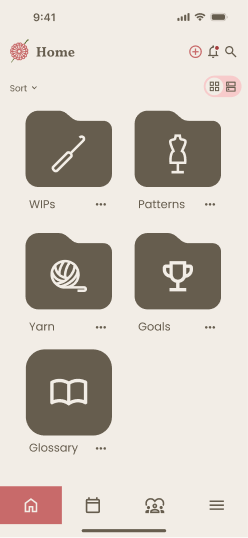
Mobile app home screen showing folders labeled WIPs with crochet hook icon, Patterns with dress form icon, Yarn with ball of yarn icon, Goals with trophy icon, and Glossary with open book icon.Mobile app screen showing home page with folder icons for WIPs and Patterns and a menu with options for new project, folder, yarn, goal, and file.Mobile app screen titled New Project with fields for Title, Description, Due date, Photos, and Pattern file, all optional except Title.Mobile screen showing a new project titled 'Bumble Bee' with amigurumi crochet instructions and materials listed, plus photos of a crocheted bumble bee.
Calendar app screen for October 25, 2024, showing an all-day event 'Complete Sonia's Scarf' and a 17:00 to 19:00 event 'Plan next crochet project' in day view.Mobile screen showing an edit event page for 'Complete Sonia's Scarf' with location 'Home', start and end dates on October 31, 2024, and a pop-up warning about discarding changes with options to discard or keep editing.

Calendar

Users can set deadlines or reminders for themselves in order to stay on track of their projects.

Community

Users have the option to join the Yarn Circle Discussion tab to share their latest creations or interact with other hobbyists to stay inspired.

Mobile screen showing a discussion page with users posting about crocheting a blanket, featuring photos of a green and cream crocheted blanket.Social media post by Eliza Johnson showing two photos of a green, white, and dark green crocheted blanket with comments from users praising and asking about the yarn.

Usability Testing

Purpose

The main goal was to assess if users can navigate through the Yarn Circle app with ease and ensure that the layout of the app design is consistent with user expectations.

Tasks
  • Save a new project to a folder
  • Edit a date in the calendar
  • Like and comment on a post
Participants

A total of 6 volunteers provided feedback for usability testing. Their commentary during each session was taken into consideration for further iterations.

Feedback
  • Previous shape of folders confused users on whether or not it was a folder
  • Users would go back to check if task was completed or saved
  • Users saved events in calendars in different ways from other users
  • Suggestions for color options for calendar, a community gallery, and relocation of some features
Changes
  • All-day toggle has been made available for use
  • End dates are now customizable
  • Week view was removed as users did not utilize this option
  • Any changes made after a task are now reflected (visual feedback)
  • Components in home page have been updated to be shaped like folders
  • Project options have been updated to new yarn, goals, and files.

Priority went to the calendar, as most users experienced issues when trying to edit events.
Suggestions for additional features were low priority since some do not correlate with existing task flows.

#5 Final Design

Prototype Link to Figma

#6 Reflection

Working on Yarn Circle was an enriching experience. I wanted to address a critical need in the crocheting community by combining practical project management with social connection in a single platform. Throughout the design process, I found it quite challenging to balance functionality without overwhelming users. So instead of keeping projects and socials separate, I wanted Yarn Circle to encompass both as it was a common theme during research.

This project taught me the value of user research, especially when designing across generational technical gaps, creating a flexible organization system, and iterative testing with community members. It was exciting to design something for a hobby that I also enjoy, so a lot of love went into this design. Going into this project I already had a few ideas in mind for this app’s design, but I now recognize that staying open-minded during research was going to address the needs of an entire community, rather than my own needs or presumptions of others’. 
And that is something I will take with me in any future projects.

In retrospect, I would have loved to conduct more diverse user research and testing earlier in the design process, as well as incorporate more accessibility features.
To further improve the project, I would like to expand on the glossary and include short-form media tutorials on specific stitches, as well as include a community gallery of finished creations for users to browse.

↑ Back to Top